Home
» New Trends
»
Tech-Enabled Senior Care: Choosing AI and Smart-Home Tools for Aging in Place
Tech-Enabled Senior Care: Choosing AI and Smart-Home Tools for Aging in Place
Technology can make aging in place safer and easier, but the best setup is rarely the one with the most devices. The useful question is: what problem needs to be solved, how quickly must someone respond, and how much monitoring is the older adult comfortable with?
That distinction matters because “senior care technology” covers very different tools. A wearable emergency button can summon help after an incident. Passive motion sensors can flag a change in routine. Smart speakers can reduce the need to reach for switches or phones. Remote patient monitoring devices can send clinically relevant measurements to a care team. AI may help interpret patterns across some of these systems, but it does not turn a consumer gadget into a medical device or replace a caregiver, clinician, or safer home design.
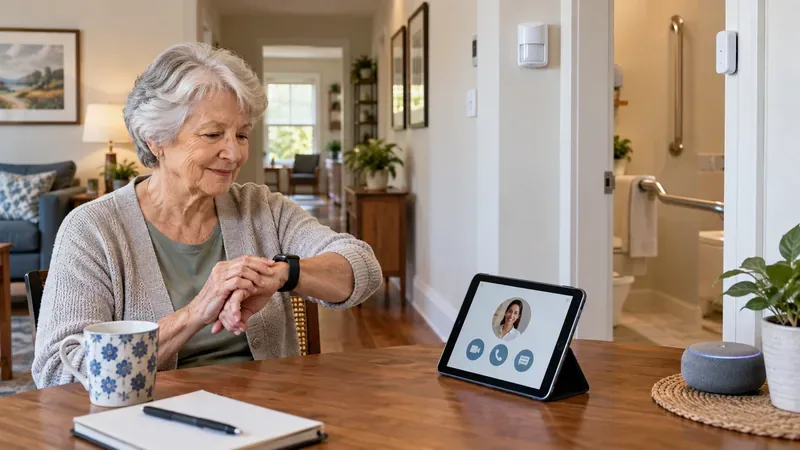
An older adult uses a smartwatch and tablet in a home equipped with unobtrusive sensors, a smart speaker, and bathroom grab bars—an example of how digital tools can complement physical safety changes.
Start with the need, not the gadget
Aging in place means remaining at home as needs change. The preference is common: AARP’s 2024 Home & Community Preferences survey, fielded in summer 2024 and updated in November 2025, found that 75% of Americans age 50 and older wanted to stay in their current home for as long as possible. The same research also shows why technology alone is not enough: housing accessibility, transportation, health services, and reliable utilities all shape whether staying home remains practical. See the original AARP research.
The National Institute on Aging likewise recommends planning ahead and correcting immediate home hazards before adding more complex supports. Its home safety guidance, updated June 5, 2025, includes better lighting, secure flooring, handrails, and grab bars. Those changes have a major advantage over connected devices: they keep working during an internet outage and collect no personal data.
Option
Best fit
Main strength
Main tradeoff
What to verify
Home modifications
Fall prevention and mobility
Always-on protection without batteries or data collection
Clinician-directed tracking of specific health measures
Can integrate measurements into a care plan
More setup, clinical oversight, and data governance
Who reviews data, what triggers escalation, device status
For fall concerns, combine physical safety with a response path
Falls deserve special attention because the Centers for Disease Control and Prevention reports that falls are the leading cause of injury among adults age 65 and older. Its February 26, 2026 data page states that more than 14 million older adults—about one in four—report a fall each year. The CDC also emphasizes that falls are preventable and points to exercise, home modification, and clinical interventions. See the CDC older-adult falls data and its compendium of effective interventions.
For someone at meaningful fall risk, a sensible technology layer is one that shortens the time between a problem and human help. A wearable may be preferable if the person is active outside the home and remembers to wear it. Passive sensors may be preferable if remembering or charging a device is unreliable. Neither choice removes the need to address loose rugs, poor lighting, stairs, bathroom surfaces, medications, balance, or other risk factors.
Wearables or passive sensors? The tradeoff is participation versus privacy
Choose a wearable when portability matters
Wearables can combine help buttons, motion sensing, location, and other functions in one device. Their weakness is behavioral: a device on the charger, in a drawer, or left behind cannot help. Before buying, check whether the system works away from home, whether cellular service is built in or requires a phone, how long the battery lasts in realistic use, who receives alerts, and what happens if the response center cannot reach the wearer.
Choose passive sensors when low-friction monitoring matters
Passive infrared motion sensors, contact sensors on doors, bed sensors, and other ambient devices can observe patterns without requiring the resident to press a button. AI or statistical models may compare current activity with an individual baseline and flag unusual changes. That can be useful for noticing “something is different,” but it is not the same as diagnosing the cause.
A 2025 study involving 112 adults age 50 and older found that acceptance of passive monitoring varied with perceived need, and participants highlighted privacy, autonomy, cost, and ease of use as important design concerns. The study is available through PubMed. A separate 2026 feasibility study of passive sensing in residential aged care found promising signals for fall-risk assessment but explicitly called for further validation and reported concerns about privacy and false alerts. See the original feasibility study.
Voice assistants are useful for convenience, not as a universal emergency system
Voice control can be valuable when reaching a light switch, thermostat, phone, or remote is difficult. It can also make reminders and simple routines easier. The tradeoff is that speech recognition can be affected by accent, background noise, weak speech, hearing limitations, or network problems. Families should confirm exactly what a chosen service can and cannot do during an emergency instead of assuming any smart speaker can substitute for a monitored alert service.
Microphones also change the privacy equation. During a telehealth appointment, for example, the U.S. Department of Health and Human Services recommends considering whether nearby smart speakers or security cameras could overhear or record sensitive information. See the HHS telehealth privacy guidance.
Remote health monitoring is different from general smart-home monitoring
A blood pressure cuff, pulse oximeter, scale, glucose device, or other connected health product may be part of remote patient monitoring when a clinician has defined what to measure and how the results are reviewed. That is different from a consumer smart-home system noticing that someone got up later than usual.
If a product makes a medical claim, verify its regulatory status rather than relying on the word “AI” in marketing. The U.S. Food and Drug Administration maintains an AI-Enabled Medical Device List for devices it has identified as incorporating AI and authorized for marketing. The FDA also notes that the list is not comprehensive, so a product should be checked by its specific authorization and intended use.
What AI can realistically add
AI is most credible in senior care when it performs a narrow task on well-defined data: detecting changes in mobility, classifying activity, prioritizing alerts, or helping a clinician interpret a measurement within an approved workflow. Research using in-home sensing has shown that motion and other passive data can capture meaningful daily patterns. For example, a study of 44 community-dwelling adults used smart-home sensors for three to four months and found that sensor-derived activity markers were associated with self-reported daily cognition and behavior. The findings are promising, but the sample was small and the work does not establish that a consumer system can diagnose decline. See the original study on smart-home data and daily cognition.
That is the central limitation of predictive senior-care systems: a change in routine may reflect illness, a visitor, travel, a broken sensor, a late breakfast, or a deliberate lifestyle change. The safest designs use AI as a signal for human review rather than as an unquestioned decision-maker.
Privacy and cybersecurity are part of the care plan
A smart home may reveal when someone sleeps, leaves home, uses the bathroom, opens the refrigerator, or receives visitors. That can support care, but it also creates a detailed behavioral record. NIST’s 2025 research on smart-home users found that security and privacy perceptions differ by device category and that users can be uncertain about how to protect devices and data. See NIST Special Publication 1343.
Do not assume that every health-related app or connected device is protected by HIPAA. HHS explains that information placed in many consumer apps may fall outside HIPAA when the app is not provided by a covered entity or its business associate. The HHS guidance on personal devices and health information explains this distinction. Separately, the Federal Trade Commission’s Health Breach Notification Rule applies to certain personal health record vendors and related entities outside HIPAA.
Before installation, ask who owns the account, who can see the data, how long data are stored, whether recordings are retained, whether data are used for advertising or model training, whether two-factor authentication is available, how security updates are delivered, and how to delete data when the service is no longer needed.
Recommendations by real-world need
For a healthy, independent older adult who mainly wants convenience: start small with better lighting, smart switches or plugs where appropriate, voice control, and simple reminders. Avoid continuous monitoring unless there is a clear benefit.
For someone living alone with fall concerns: prioritize home safety modifications and a reliable way to summon or trigger human help. Add a wearable or passive sensing based on whether the person will consistently wear a device.
For a family worried about subtle changes in routine: consider low-resolution or non-camera sensors before indoor cameras. Agree in advance on which deviations justify a call, visit, or clinical discussion.
For medication complexity: use reminders or connected dispensing only as part of a clearly managed medication routine. Confirm how missed doses, refills, and schedule changes are handled.
For chronic-condition monitoring: favor clinician-directed remote monitoring with a defined escalation pathway over a general wellness dashboard.
For cognitive impairment or increasing support needs: choose systems that minimize daily setup, but involve the older adult as much as possible in consent, alert rules, and who can access information.
A practical buying checklist
Before committing to a senior-care technology, test it against the care scenario rather than the feature list:
What exact problem is this device intended to solve?
Does it still work if power, Wi-Fi, or a paired phone fails?
Who receives an alert, and how quickly can that person act?
What is the false-alarm process, and can thresholds be personalized?
Does the resident need to charge, wear, speak to, or remember the device?
Can the system be used without indoor cameras or continuous audio if privacy is a concern?
Who can access, export, and delete the data?
Are software and security updates provided automatically or for a stated support period?
If the product makes a health or medical claim, is that specific use backed by appropriate regulatory authorization or clinical evidence?
Can the system be simplified or removed later without disrupting essential care?
The best system is usually layered, not futuristic
Tech-enabled senior care works best as a layered support system. Physical home safety reduces hazards. A wearable or passive sensor can improve awareness. Voice controls can reduce friction. Remote monitoring can connect selected health measurements to a clinical workflow. AI can help interpret patterns, but its output should remain explainable, reviewable, and tied to a human response.
The goal is not to turn a home into a surveillance center. It is to preserve independence while making the right problems easier to notice and the right help easier to reach. The most appropriate setup is the one the older adult can live with comfortably, the family or care team can actually maintain, and everyone understands well enough to know what happens when an alert appears—or when the technology fails.