Home
» New Trends
»
How to Join the 1980s AI Photo Trend: 8 ChatGPT Prompts for Viral Retro Photos
How to Join the 1980s AI Photo Trend: 8 ChatGPT Prompts for Viral Retro Photos
The easiest way to get a convincing 1980s-style photo in ChatGPT is to treat the decade as a set of visual decisions, not a single filter. Hair, wardrobe, lighting, background, camera behavior, color cast, and print texture all matter. A prompt that says only “make this look like the 1980s” may produce something broadly retro, but a prompt that names the kind of photo you want—mall snapshot, arcade flash photo, prom portrait, yearbook glamour shot, or living-room family print—gives the image model much stronger direction.
There is also a timely product change worth knowing. As of September 12, 2026, OpenAI’s current Images in ChatGPT help page describes newer ChatGPT Images capabilities, including sharper detail, more precise editing, faster generation, image templates, uploaded-image editing, and flexible aspect ratios. OpenAI also says ChatGPT Images is available on web, iOS, and Android. That makes the current retro-photo workflow more straightforward: you can start with a portrait, ask for a period transformation, then refine individual details in the same conversation.
This guide focuses on prompts and repeatable choices rather than claiming that any one look is guaranteed to “go viral.” Social performance depends on the platform, audience, timing, caption, and originality. The goal here is a photo that looks intentional enough to stop a scroll and believable enough to feel like a found print from the era.
Step 1: Start with a source photo that gives the edit room to work
If you want the final image to resemble you, upload a clear photo with the face unobstructed, reasonably even lighting, and enough space around the head and shoulders for a hairstyle or wardrobe change. A simple background is helpful because it gives ChatGPT fewer modern objects to reconcile with the requested era.
You do not need a studio portrait. A phone photo can work well, but avoid heavy beauty filters, extreme wide-angle distortion, sunglasses, hands covering the face, or very dark lighting if facial consistency is important. If privacy matters, crop out house numbers, work badges, license plates, screens, or other identifying details that do not need to be part of the transformation.
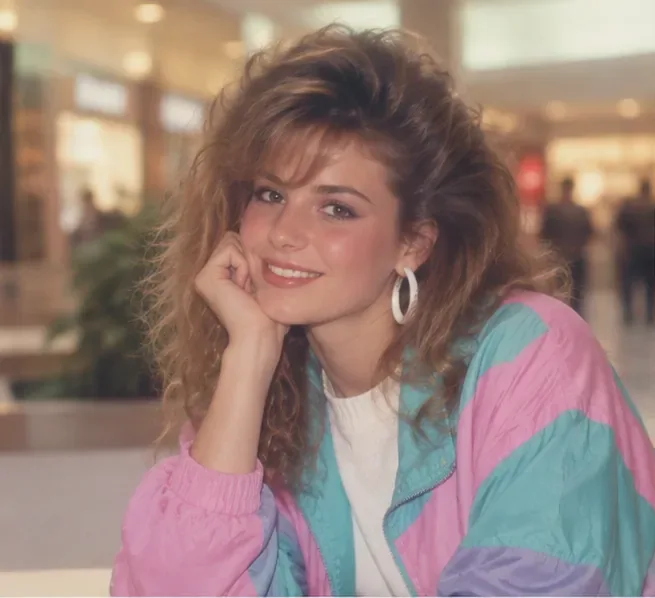
A mall-portrait direction works well when the prompt combines teased hair, pastel outerwear, soft direct flash, and a gently blurred indoor background.
Step 2: Build the prompt from five concrete ingredients
OpenAI’s image prompting guidance recommends clear, descriptive instructions and notes that the most important details are usually the subject, action, setting, style, framing, lighting, and constraints. For an 1980s portrait, a practical formula is:
“Transform this portrait into a late-1980s mall snapshot. Keep the same person, facial proportions, skin tone, and expression. Add voluminous feathered hair, a pastel color-block windbreaker, white hoop earrings, soft on-camera flash, slightly warm print color, mild film grain, and a softly blurred shopping-mall background. Make it look like a scanned consumer photo print, not a modern fashion shoot. No logos, no readable text, no smartphone, no modern signage.”
The preservation sentence matters when you are editing a real portrait. It tells the model which details are meant to stay stable while the clothes, environment, and photographic treatment change.
A quick 1980s prompt checklist
Prompt element
Useful 1980s details
Why it helps
Setting
Mall, arcade, school portrait studio, wood-paneled living room, roller rink, basement party
Direct flash, soft studio key light, colored arcade spill, warm tungsten lamp
Makes the scene feel photographed rather than illustrated
Image texture
Fine film grain, slight softness, warm print cast, minor dust, subtle vignette
Adds believable analog imperfection
Constraints
No modern phones, no logos, no readable text, no futuristic neon UI
Reduces obvious anachronisms
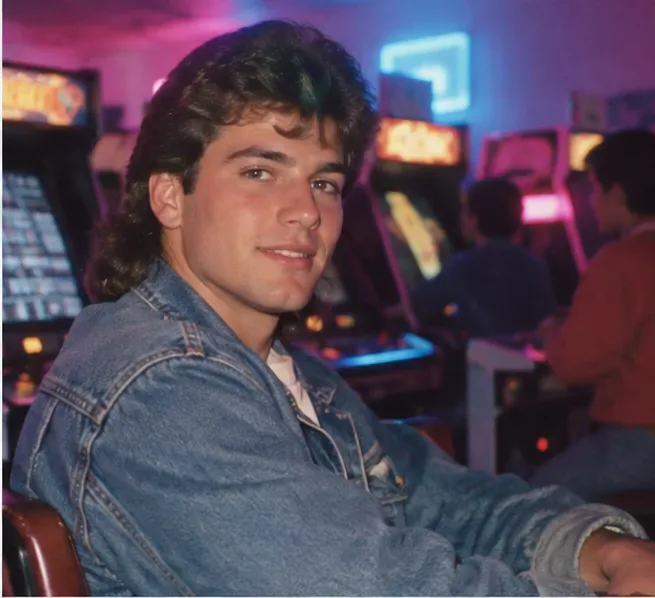
For an arcade look, direct flash, denim, colorful machine glow, and a crowded game-room background produce a more specific result than simply asking for “neon 80s.”
Step 3: Pick a recognizable photo archetype instead of a vague “retro” style
The best prompts imitate the logic of a real photo someone might have owned in the 1980s. Choose one archetype, then make its details consistent. These eight prompts are designed to be copied and personalized.
1. Mall snapshot
“Turn this photo into a candid late-1980s mall snapshot. Keep my face and expression recognizable. Give me feathered, voluminous hair, a pastel teal-and-pink windbreaker, simple white earrings, and natural makeup. Use soft on-camera flash, warm consumer-film color, mild grain, and a slightly out-of-focus indoor mall behind me. No modern signs, phones, or logos.”
2. Neon arcade portrait
“Rework this portrait as a 1987 arcade photo. Keep the same person and facial structure. Add a faded denim jacket, slightly tousled period hairstyle, direct flash on the face, magenta and cyan arcade light in the background, dark carpet, and rows of cabinet games. Add subtle film grain and slight print softness. Avoid readable game titles and modern LED displays.”
3. Prom-night studio portrait
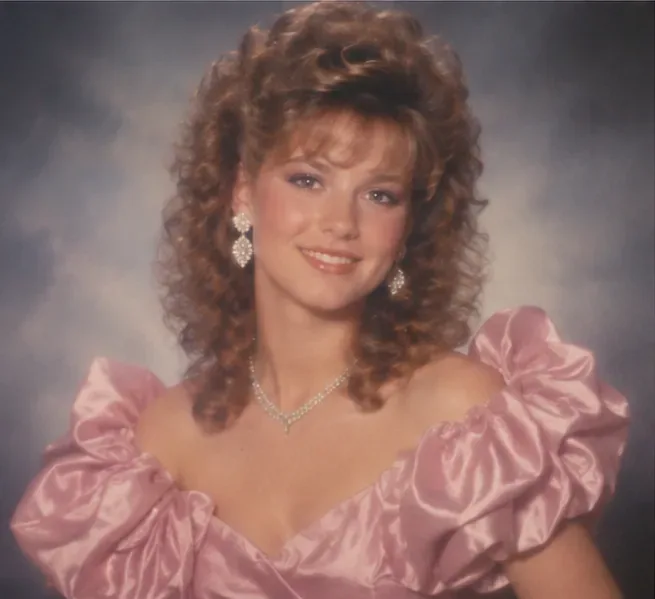
“Create a formal 1980s prom portrait from this photo. Preserve my identity and pose. Use a satin outfit with dramatic shoulders, polished jewelry, curled high-volume hair, soft glam makeup, and a smoky blue-gray studio backdrop. Light it like a department-store portrait studio with gentle diffusion, low contrast, and a slightly soft printed-photo finish. No text or logos.”
A formal studio prompt becomes more convincing when the lighting, smoky backdrop, satin fabric, jewelry, and curled hairstyle all point to the same period portrait tradition.
4. Wood-paneled living-room snapshot
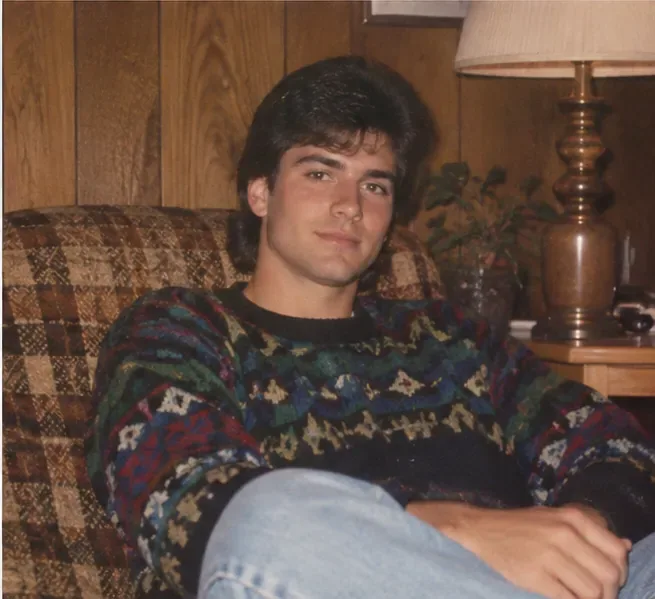
“Transform this into a casual 1980s living-room snapshot. Keep my face and body proportions natural. Dress me in a dark geometric knit sweater and light jeans. Place me on a patterned couch in a wood-paneled room with a warm table lamp and houseplant. Use direct compact-camera flash, slight red-eye-era color behavior without actual red eyes, warm print tones, and modest grain. No modern electronics.”
5. 1980s yearbook glamour shot
“Turn this head-and-shoulders portrait into an American 1980s yearbook glamour photo. Preserve my identity. Add softly feathered hair, understated period makeup, a simple collared top, a mottled blue studio background, diffused frontal light, a gentle vignette, and a lightly airbrushed print texture. Keep it tasteful and believable, with no text or school logo.”
6. Roller-rink flash photo
“Make this look like a spontaneous 1980s roller-rink photo. Keep my face recognizable. Add a bright athletic jacket, high-waisted jeans, period sneakers, colorful rink lights, reflective floor highlights, and deep background shadows. Use a strong compact-camera flash, slight motion blur in the background, and grainy consumer-film texture. No modern screens or branding.”
7. Home video party still
“Reimagine this as a paused frame from a 1988 home-video party. Preserve my face and expression. Use warm indoor tungsten light, slightly washed color, modest video noise, soft edge detail, a 4:3 home-video composition, and a casual party background with period clothing and decor. Do not add fake timestamps, logos, or readable captions.”
8. Department-store fashion portrait
“Transform this into a polished 1980s department-store fashion portrait. Keep my facial features consistent. Add an oversized structured blazer, simple gold-tone accessories, full but controlled hair, a neutral studio backdrop, softbox-style portrait lighting, subtle film grain, and slightly warm print color. Make it elegant rather than costume-like. No modern logos or text.”
For a believable home snapshot, modest clothing, household textures, warm lamplight, and compact-camera flash can feel more authentic than exaggerated neon styling.
Step 4: Refine one variable at a time
Once the first version is close, do not rewrite the entire prompt unless the concept is wrong. OpenAI’s prompting guidance specifically recommends small, targeted revisions because they are easier to follow and help keep the image from drifting. Ask for one or two changes at a time.
Useful follow-ups include: “Keep everything else the same; reduce the hair volume by 20 percent.”“Change only the lighting to a harsher compact-camera flash.”“Keep my face unchanged; replace the background with a modest 1980s mall corridor.” Or: “Remove the fake film border and keep only subtle grain and print softness.”
If you need a local edit, ChatGPT’s current image editor can target a selected region, but OpenAI cautions that selections are not always exact and edits can extend beyond the highlighted area. For a face-preserving transformation, inspect the eyes, teeth, jewelry, fingers, and background signage after every major change.
How to keep the result retro without making it look like a parody
Many weak 1980s prompts overuse the same shorthand: purple neon, chrome typography, grid horizons, and sci-fi glow. Those motifs belong to some 1980s design traditions, but they do not describe most ordinary photographs from the decade. If your goal is a believable personal photo, everyday contexts often work better: a mall food court, a family couch, a school studio, an arcade, a roller rink, or a simple portrait backdrop.
Also resist the urge to stack every analog artifact into one prompt. Heavy VHS noise, huge film grain, light leaks, scratches, chromatic aberration, date stamps, and extreme blur at the same time can make the image look like a modern imitation of old media. Pick the medium first. A scanned 35mm print should not look exactly like a VHS frame; a school portrait should not look like a nightclub snapshot.
Best settings for social sharing
Choose the aspect ratio based on where the image will be posted rather than forcing every result into a square. OpenAI’s current image help page says ChatGPT Images supports different aspect ratios, either through the aspect-ratio control or by including the desired ratio in the prompt. A vertical portrait generally gives more room for hairstyle and clothing, while a square crop can work well for profile-style posts.
Before sharing, check the final image at full size. Look for accidental text, malformed jewelry, repeated background people, inconsistent hands, impossible reflections, or modern objects that slipped into the scene. If something is wrong, ask for a focused correction instead of regenerating from scratch.
A reusable master prompt
If you want one prompt you can adapt repeatedly, use this structure:
“Transform the uploaded portrait into a [specific 1980s photo archetype] from around [year or early/mid/late 1980s]. Keep the same person, facial structure, skin tone, expression, and overall proportions. Change the hairstyle to [period hairstyle], wardrobe to [period clothing], and setting to [period setting]. Photograph it with [flash/studio/tungsten/arcade lighting], [framing], [film or video texture], and [color treatment]. Make it feel like an authentic personal photograph rather than a costume shoot. Keep the image natural and physically plausible. No modern phones, no current logos, no readable text, no anachronistic screens, and no extra people unless requested.”
That formula is flexible enough for a glamorous prom portrait or a deliberately ordinary family snapshot. The main rule is consistency: choose one place, one camera behavior, one wardrobe direction, and one level of analog imperfection. The more those elements agree with each other, the more convincing the finished 1980s photo will feel.
What to do if your result still looks too modern
Replace vague style words with physical details. Ask for direct flash, warm print color, a mottled studio backdrop, or a wood-paneled room instead of simply saying “retro.”
Remove modern objects explicitly. Phones, current signage, LED strips, minimalist interiors, and contemporary haircuts are common giveaways.
Reduce perfection. Ask for slight softness or fine grain, not aggressive damage.
Choose a narrower year range. “Late 1980s mall portrait” is easier to interpret consistently than “vintage 80s aesthetic.”
Preserve identity in every edit. Repeat the instruction to keep facial structure, skin tone, expression, and proportions unchanged when those details matter.
The strongest retro portraits do not depend on a secret prompt. They come from a clear visual target, period-specific details, and restrained iteration. Start with one recognizable 1980s photo type, get the face and composition right, then tune the hair, wardrobe, lighting, and print texture until the image feels like a plausible photograph someone could have pulled from an old album.