Home
» News
»
What Are the Main Causes Behind Widespread Cloud Platform Downtimes?
What Are the Main Causes Behind Widespread Cloud Platform Downtimes?
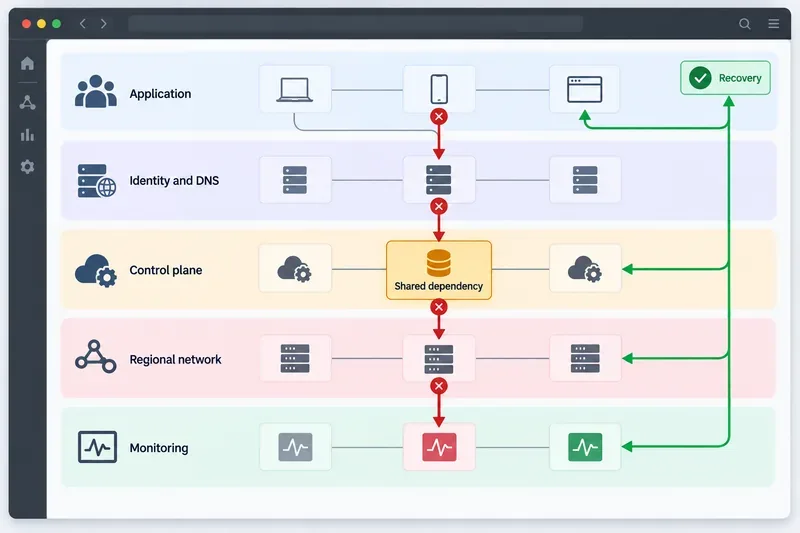
The short answer: widespread cloud platform downtime usually comes from a chain of failures, not one isolated broken server. A risky configuration or software change can affect a shared dependency such as identity, DNS, authorization, or a control-plane API. The first failure then triggers retries, traffic shifts, or automated scaling, which increase load and spread the impact across regions or products. Weak observability and an untested recovery path can make the outage last longer.
That pattern matters because it changes what you should prepare for. “The cloud” is not one machine and “the provider is down” is not a complete diagnosis. Your application may depend on several provider services, your own configuration, external APIs, and a recovery process that works only if it has been tested. This guide explains the main causes, what a beginner should check first, and the mistakes that make a broad outage harder to manage.
Conceptual view of how a failure in a shared cloud dependency can cascade through identity, control-plane, regional, and monitoring layers before recovery is restored.
First, understand what “widespread downtime” means
Availability is whether a service can successfully answer a request. Performance degradation means it answers, but too slowly or with elevated error rates. A broad incident may affect the data plane—the systems that serve application traffic—or the control plane—the APIs and internal systems used to create, configure, authenticate, and manage resources. A control-plane outage can prevent deployments or scaling even while already-running workloads continue to serve some traffic.
A shared dependency is a service that many products or request paths rely on. DNS, identity and access management, certificate validation, routing, metadata, quotas, and observability are common examples. If that dependency is centralized or has a common failure mode, a small defect can have a much larger blast radius—the set of customers, regions, or services affected by one failure.
The main causes behind widespread cloud platform outages
1. A bad change, configuration, or automation rule
Changes are a leading source of large incidents because they can be correct in one context and unsafe at platform scale. A permission edit, routing rule, feature flag, schema change, or automated capacity action may touch every region or every customer-facing machine. Automation can amplify the result before a human sees it.
Cloudflare’s official postmortem for November 18, 2025 illustrates this class of failure. A database permissions change caused duplicate rows in a Bot Management feature file. The file became roughly twice as large, propagated to machines worldwide, and exceeded a limit in routing software. Cloudflare says the incident was not caused by a cyberattack; the failure came from a configuration and software interaction. The company stopped propagation and deployed a known-good file. Read Cloudflare’s November 18, 2025 outage postmortem for the provider’s detailed account.
2. Failure of a shared control-plane or foundational service
Foundational services often sit underneath many apparently unrelated products. Identity, authorization, internal DNS, monitoring, metadata, and the APIs used to provision resources can become a common point of failure. The customer-facing symptoms may look different—login failures, deployment errors, timeouts, or missing metrics—but the underlying dependency can be the same.
In its December 7, 2021 US-EAST-1 post-event summary, AWS described an unexpected interaction involving automated scaling activity and internal network devices. AWS said the affected network hosted foundational services, including monitoring, internal DNS, authorization services, and parts of the EC2 control plane. Connection attempts and retries then contributed to congestion. AWS also reported that its Support Contact Center and parts of its service-health communication path were affected. The AWS post-event summary is a useful example of why a provider can have difficulty both restoring services and diagnosing them at the same time.
3. Overload, retry storms, and cascading failure
When a request fails, clients often retry. A retry storm occurs when many clients retry at once, especially without exponential backoff—a strategy that increases the wait between attempts—and jitter, which adds a small random delay. Those retries consume the same scarce capacity and can turn a partial failure into a wider outage.
Other load multipliers include health checks that run too frequently, automatic failover sending traffic to an already-busy region, queues that release a backlog all at once, and autoscaling policies that react to symptoms rather than cause. A service may therefore fail even though its servers have not physically broken. The important question is not only “Can the provider add capacity?” but also “Are our clients and automation adding more work to the failing path?”
4. Regional infrastructure, network, power, or hardware problems
Cloud platforms still depend on physical data centers, power systems, cooling, fiber links, routers, storage devices, and regional network paths. Redundancy lowers risk, but it does not make every failure invisible. A shared facility, availability zone, inter-region link, or routing boundary can affect many services at once.
Regional recovery may also be uneven. In its June 12, 2025 incident record, Google Cloud reported that multiple products experienced API issues related to an underlying dependency, with recovery varying by location; the record specifically noted slower recovery in us-central1 and in US and multi-region services. The Google Cloud Service Health incident record shows why checking one region or one product is not enough to understand the full scope.
5. Software defects, data-shape errors, and hard limits
A platform can be healthy until it receives an unexpected input: a file that is larger than a parser limit, a duplicate record, an unusual API response, or a data migration that exposes an assumption in older code. These failures are especially dangerous when the same release or configuration is distributed globally.
Hard limits are not always obvious from normal testing. A configuration file may be valid, but too large for a downstream component. A request rate may be acceptable in one region, but exceed a quota after failover. A recovery job may be safe once, but create duplicate work when repeated. Testing should cover bad data, partial dependency failure, regional evacuation, and repeated execution—not only the happy path.
6. Security events, traffic anomalies, and incorrect early assumptions
Distributed denial-of-service attacks, stolen credentials, abuse, and malicious configuration changes can cause outages. But a traffic spike or authentication failure is not proof of an attack. Treating every incident as a security event can send the response in the wrong direction and delay a configuration rollback.
Use evidence: compare request patterns, authentication logs, change records, provider status updates, and independent probes. Keep security escalation available, but separate “what we know” from “what we suspect.” Cloudflare’s 2025 postmortem is a concrete reminder that an outage can initially look like an attack and still have a different root cause.
7. Blind spots in monitoring and status communication
An outage becomes harder to contain when the monitoring system depends on the same failing path as the application. A dashboard can show that a virtual machine is running while customers cannot complete a transaction. Google Cloud’s guidance on customer-focused SLOs and custom metrics explains this distinction: infrastructure uptime is not the same as a successful customer action.
Use at least one independent synthetic check—a scheduled test that performs a safe customer-like transaction—from outside the affected environment. Keep a second way to reach incident updates, and record provider status pages, internal alerts, and customer reports in one timeline. Do not assume a status page is infallible: Cloudflare reported that its own status page was also unavailable during the November 2025 incident, although it was hosted outside Cloudflare’s infrastructure.
A beginner’s preparation and response path
Before an outage: map what your service really depends on
Start with a simple dependency map. Include DNS, identity, secrets, certificates, queues, databases, object storage, third-party APIs, content delivery, monitoring, and the provider region. Mark which components are required for every request and which can be degraded or bypassed. This exercise often reveals that two “independent” regions still share identity, DNS, deployment tooling, or a single external vendor.
Define your RTO (recovery time objective, the target time to restore service) and RPO (recovery point objective, the acceptable amount of data loss measured in time). Then choose controls that match the business need. A small internal dashboard may accept manual recovery. A payment or emergency workflow may need multi-region service, tested data replication, and a documented failover owner.
During an outage: confirm scope before changing things
Check whether the symptom is an application defect, a provider incident, a regional issue, or a dependency failure. Compare multiple regions, accounts, networks, and customer paths where safe.
Freeze unrelated deployments and configuration changes. Preserve timestamps, request IDs, error samples, recent changes, and the first customer-visible symptom.
Check the provider’s official service-health page and incident record, but do not rely on one signal. Compare it with independent probes and your own logs.
Reduce load safely. Use bounded retries with exponential backoff and jitter, circuit breakers that stop calls to a failing dependency, and queue controls that prevent a sudden replay storm.
Fail over only when the destination is ready and the procedure has been tested. Verify credentials, DNS TTL behavior, data consistency, idempotency, and downstream capacity before directing more traffic.
Communicate what is confirmed, what is being investigated, what customers should do, and when the next update will arrive. Avoid promising a recovery time that the evidence does not support.
Quick reference: clue, likely cause, and useful control
Early clue
Likely cause
Preparation or control
Errors begin immediately after a deploy or policy change
Configuration or software change
Canary releases, approvals, version control, and fast rollback
Several products fail to authenticate or resolve names
Shared identity, authorization, or DNS dependency
Dependency mapping and an independent access path
Latency rises as retries increase
Overload or retry storm
Backoff, jitter, circuit breakers, and load shedding
One region recovers while another remains impaired
Regional capacity or dependency difference
Tested multi-region failover and regional runbooks
Infrastructure looks healthy but transactions fail
Observability gap or downstream dependency
Customer-level SLOs and synthetic transaction checks
Mistakes that make widespread downtime worse
Assuming a provider-managed service means your application needs no resilience plan.
Measuring only instance uptime instead of login, checkout, search, or other critical customer journeys.
Using infinite retries or restarting everything at once.
Failing over to a destination that has not been tested under real load.
Making several emergency changes without recording which one helped.
Keeping monitoring, deployment, and incident communication on the same dependency path.
Calling an incident a cyberattack before the evidence supports that conclusion.
Bottom line
The main causes of widespread cloud downtime are interacting systems: unsafe changes, shared dependencies, overload and retries, regional infrastructure failures, software and data-shape defects, security or traffic events, and blind spots in detection. You cannot eliminate every provider outage, but you can limit its blast radius. Map dependencies, measure customer outcomes, make retries polite, keep changes reversible, test failover, and maintain an incident record that distinguishes facts from hypotheses.
Source note: This article was checked on September 16, 2026. The provider incidents are documented examples, not an exhaustive list, and provider postmortems may not disclose every internal detail. Product names, architectures, status pages, and recovery behavior can change over time.