The Rise of Machines: Real World Applications of AI

Kunstig intelligens er ikke i fremtiden, det er her lige i nuet I denne blog Læs, hvordan kunstig intelligens-applikationer har påvirket forskellige sektorer.
This article contains information about the Nextcloud application that can be deployed on Vultr.
Nextcloud runs on the Ubuntu Server LTS operating system. You can log into this system with an SSH client using the root login found on your Vultr control panel.
To access the Nextcloud application, navigate to https://[SERVER_IP]/ in your web browser. Substitute the [SERVER_IP] with the IP address of your VPS. The SSL certificate warning can be safely ignored. This is explained in further detail below. Your Nextcloud login credentials are listed in the Vultr control panel.
The Vultr team has provided a backup script for convenience. This is located in the /root/ folder. You can run this file by logging in as root and executing:
cd /root/
sh backup-nextcloud.sh
A backup of the Nextcloud database, source code, and uploaded files will be created in the /root/ folder. Ensure that you have enough space on your VPS to duplicate all of your files before running it.
If your instance was deployed after December 1st 2019 we have included a script for your convenience to reset your your Nginx config files back to the default for you.
ssh as root./opt/vultr/fix-vhost.shYour Nextcloud server must be accessed with https:// URLs. http:// URLs will be rewritten to https:// By default, the https:// URL uses a self-signed certificate, which displays a security warning. This can be safely ignored.
Depending on your plans for your Nextcloud site, you may want to update the certificate to one provided by an actual certificate authority. This will remove the security warning error. To install a new certificate, do the following:
ssh as root.server.crt and server.key files in /etc/nginx/ssl/ with the updated certificate. Details on converting certificate formats are outside of the scope of this article.systemctl restart nginx.service && systemctl restart php7.2-fpm.service ( PHP version may vary )If you plan on using a domain with your Nextcloud server, you will need to point the DNS "A record" to your [SERVER_IP]. This will allow you to access Nextcloud by navigating to your website (www.example.com). Nextcloud also requires that you add your domain to its "trusted domain" list. You can add a domain to the trusted domain list either in the Nextcloud interface, or by manually editing /var/www/html/config/config.php.
There is a MySQL database server running on the VPS. This is used by Nextcloud. You can connect to the database by executing the following:
mysql -u root
The MySQL root password is saved on the VPS in /root/.my.cnf.
Vultr applications use modern releases of software packages. Applications are configured to be deployed with specific versions of software. Over time, the Vultr team will update the application offerings to include newer operating systems, package versions, etc. This document only provides up-to-date information about the latest version of this application. Vultr applications are updated without notice. If you plan to build a project or infrastructure based on our application templates, we recommend taking a snapshot of the application used in your initial deployment.
Kunstig intelligens er ikke i fremtiden, det er her lige i nuet I denne blog Læs, hvordan kunstig intelligens-applikationer har påvirket forskellige sektorer.
Er du også et offer for DDOS-angreb og forvirret over forebyggelsesmetoderne? Læs denne artikel for at løse dine spørgsmål.
Du har måske hørt, at hackere tjener mange penge, men har du nogensinde spekuleret på, hvordan tjener de den slags penge? lad os diskutere.
Vil du se revolutionerende opfindelser fra Google, og hvordan disse opfindelser ændrede livet for ethvert menneske i dag? Læs derefter til bloggen for at se opfindelser fra Google.
Konceptet med selvkørende biler til at køre på vejene ved hjælp af kunstig intelligens er en drøm, vi har haft i et stykke tid nu. Men på trods af flere løfter er de ingen steder at se. Læs denne blog for at lære mere...
Efterhånden som videnskaben udvikler sig i et hurtigt tempo og overtager en stor del af vores indsats, stiger risikoen for at udsætte os selv for en uforklarlig Singularitet. Læs, hvad singularitet kunne betyde for os.
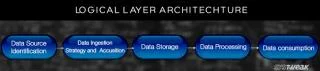
Læs bloggen for at kende forskellige lag i Big Data-arkitekturen og deres funktionaliteter på den enkleste måde.
Opbevaringsmetoderne for dataene har været under udvikling, kan være siden fødslen af dataene. Denne blog dækker udviklingen af datalagring på basis af en infografik.
I denne digitalt drevne verden er smarte hjemmeenheder blevet en afgørende del af livet. Her er et par fantastiske fordele ved smarte hjemmeenheder om, hvordan de gør vores liv værd at leve og enklere.
For nylig udgav Apple macOS Catalina 10.15.4 en supplerende opdatering for at løse problemer, men det ser ud til, at opdateringen forårsager flere problemer, hvilket fører til mursten af mac-maskiner. Læs denne artikel for at lære mere