Introduction
Creating Your First Programs
Conclusion
Introduction
What Is PHP?
PHP (Hypertext Preprocessor) is a versatile scripting language that gives users the ability to create a plethora of applications, especially server-side web development. You can use PHP for the following:
- Create dynamic websites, web applications as well as your own API service
- Interact with third party APIs
- Process data (XML, HTML DOM and more)
- Manipulate databases (PHP supports MySQL/MariaDB, SQLite, MongoDB, and more!)
Having said that, a large advantage to PHP is that it's a loosely typed language. You won't have to worry about declaring specific types. Rather than typing (int) $variable = 0;, for example, you can simply use $variable = 0; and PHP will automatically detect the variable type.
Other Advantages
In addition to being open source, PHP is also:
- Easy to install
- Multi-platform (runs on any operating system on which it is installed)
- Fast (compilation of code is done real-time, as opposed to pre-compiled languages such as C#)
- Open-source
What Will This Guide Cover?
This guide will cover:
- PHP conventions
- Creating a "Hello, world!" page and a simple calculator
- How to interact and query a 3rd party API to get the current weather
Extra Documentation
If you ever get lost and need to find a method/function, visit PHP's documentation page.
Creating Your First Programs
Conventions
Before we create our first application, a few important things to note are as follows:
- PHP code always starts with
<?php and typically terminates with ?>.
- PHP sends errors to a file called
error_log. For example, if you try to call a nonexistent function, you will see PHP Fatal error: followed by Uncaught Error: Call to undefined function function_that_does_not_exist().
- PHP, like most languages, is case-sensitive. In other words,
$var != $Var.
- While PHP variables don't specifically require types, you may need to cast (or change the type). This can be done by casting the type before a variable. Example:
(int) $variable = ....
"Hello, world!"
This is the most basic part of the tutorial. The "Hello, world!" portion aims to teach you how to create a proper file in order to have it parsed properly. Before we start, though, please make sure that you have a working web-server with PHP running. This tutorial assumes you are using Apache configured with php-cli. Vultr offers several PHP stacks (LAMP, LEMP) as one-click applications. When you are ready, proceed to the following steps.
Create a file called "test.php" in your web-server's root directory:
nano test.php
Populate it with the following code:
<?php
    $testString = "Hello, world!";
    print("Hello, world!<br/>"); // <br/> = HTML line break
    echo $testString;
?>
Save and exit.
When you visit test.php in your browser, you will see:
Hello, world!
Hello, world!
Note: Architecturally, print & echo are different. Functionality-wise, they are about the same.
A Simple Calculator
This program will take two inputs and add them together. This section aims to teach you about how PHP handles data types.
Create a new file called calc.php:
nano calc.php
Populate it with the following code:
<!DOCTYPE html>
<html>
    <head>
        <title>Calculator</title>
    </head>
    <body>
        <form method="POST" action="calc.php">
            <input type="number" name="firstNumber" placeholder="First #"/>
            <p>+</p>
            <input type="number" name="secondNumber" placeholder="Second #"/>
            <p>=</p>
            <input type="submit" value="Submit"/>
            <p>
                <?php
                    // The line below checks if there is a value present in both boxes.
                    if (isset($_POST['firstNumber']) && isset($_POST['secondNumber'])) {
                        // The line below returns the sum of the two values
                        echo $_POST['firstNumber'] + $_POST['secondNumber'];
                    }
                ?>
            </p>
        </form>
    </body>
</html>
Save and exit.
When you visit calc.php, you will see a form that looks like the following:
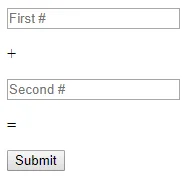
Enter any number you'd like; the answer should be the sum of the first and second numbers.
Note: This is a very basic code block without any error handling. If both numbers are not filled out, for example, the blank input will be considered 0, but a "non-numeric value" warning will be thrown.
A Simple Weather Checker
Now that we have most of the basics (simple mathematics & variables) done, we can create an application that pulls the weather for any city.
NOTE: We'll be using Dark Sky's weather API to get our data. Please obtain a free API key before proceeding to the first step.
Retrieve your API key once you've confirmed your email by clicking on "Console." You will see the following:

Proceed to the next step once you've copied the key.
Create a new file called temperature.php:
nano temperature.php
Populate it with the following code:
<?php
    // Retreive weather data for a certain set of coordinates (43.766040, -79.366232 = Toronto, Canada); change "YOUR_API_KEY" to your own API key
    $json = file_get_contents("https://api.darksky.net/forecast/YOUR_API_KEY/43.766040,-79.366232?exclude=daily,hourly,minutely,flags,alerts");

    // Tell PHP to parse the data and convert the JSON into an indexed array
    $data = json_decode($json, true);

    // Get our temperature from the array
    $temperatureInF = $data["currently"]["temperature"];

    // Convert it into Celsius using the formula: (Fahrenheit - 32) * 5 / 9
    $rawTemperatureInC = ($temperatureInF - 32) * (5 / 9);
    $temperatureInC = round($rawTemperatureInC, 2);

    // Return temperature in both Celsius and Fahrenheit
    echo "<h1>";
    echo "It is currently: " . $temperatureInF . "F or " . $temperatureInC . "C.";
    echo "</h1>"
?>
Once you save the file and visit the page, you will see something along the lines of the following:
It is currently: 57.78F or 14.32C.
This value is dynamic and updates every minute. Assuming everything worked out properly, you will have created a live weather page for your area. We've successfully combined basic PHP arithmetic along with storing values in our variables, as well as using a few basic functions.
Conclusion
Congratulations -- you've completed some basic programs! With these basics down, and some dedication, you should be able to create anything. If you're ever stuck or need to find a specific function, please refer to
PHP's documentation. It will prove invaluable when you continue to discover new functions and techniques.
While this quick-start guide doesn't cover anything too in-depth, it should give you a general idea of how the language works. Practice makes perfect though -- you'll become more comfortable as you write more and more code in PHP.