Growing up, if there’s one thing that we’re all taught when you step out of your house is that you should never EVER accept treats from strangers. If you have been active on the internet lately, you might have heard the words “Zoom Lollipop game” being mentioned at least once.
Contents
What is this Zoom Lollipop game people are on about?
The Zoom Lollipop game, also known as the Take This Lollipop 2 game or the Zoom Lollipop Challenge is an online experience that gives you a taste of what might happen if the internet gets to know too much about you.
Note: The two paragraphs below contain spoilers to what you may experience on “Take This Lollipop 2”. If you wish to experience the excitement and horror on your own, we recommend you don’t read it and directly jump on to the “How to” section further below.
The experience has been designed so that you appear to be in a Zoom-like 4-way video call once you have enabled your webcam and you sit there and wait for “others” to join the call. Moments after the call starts, everyone will be taken down in a similar fashion to those of a horror movie.
When that call ends, another 4-way video call shows up on the screen but this time you’ll be faced with a simple yet scary thought. This new video call will also include you but this time, it will not feature your real-time video. This is evident from the fact that this new “you” will have a different voice but it will almost look like it is who’s speaking.
Related: How to do Zoom backgrounds
How does the “Take This Lollipop 2” game work?
If you have played the “Take This Lollipop 2” game or have already read the spoiler above, then you must be wondering how in God’s name was the site able to regenerate your face and make it look like you’re the one who’s speaking (in the second video call). The answer is both simple and complicated – AI deep fake.
In your years of existence, if you ever researched on AI or privacy, you might have come across deepfake videos. These are videos in which a person in an existing image or video is replaced with someone else’s likeness. The same technology is what is being used to deceive you into thinking you’re actually the person who’s in the second video call in the game.
Deepfake leverages upon artificial intelligence and machine learning that trained neural architecture to study features of your face and how it moves when you speak or do an activity. Deepfakes have been used to spread fake news, execute financial fraud, celebrity pornographic videos, revenge porn, and hoaxes.
Related: Download Zoom Backgrounds for Free
How to play the Take This Lollipop 2 (Zoom Lollipop) game?
First things first! No, you don’t need to install or open the Zoom app on your computer to play the Take This Lollipop 2 game. All you need is a device with a browser and access to a front camera/webcam and you’re set to go.
When you’re ready, go to Takethislollipop.com on a web browser and when the website fully loads up, click on the lollipop at the center of your screen.
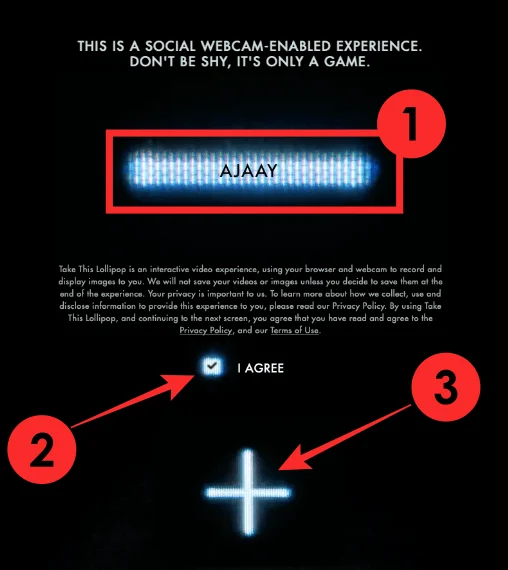
You will be asked to enter your name and will be shown a brief of what’s to expect from this webcam-based experience. The website confirms that it doesn’t extract or store your video or photo unless you give it permission at the end of your experience.
You can read the terms of use and the website’s privacy policy and when that’s done, check the box adjacent to ‘I agree’ and then click on the ‘+’ icon in the middle.
In the next screen, you will be asked to enable access to your webcam. Click on the ‘+’ icon inside the rectangular box.
Now, allow your browser to get access to your camera.
You’re now all set to enjoy the experience. Brace yourself for the fun horror that awaits you as soon as you establish a connection.
Related: How to Present on Zoom
Is Takethislollipop.com safe to visit?
Yes. It is. Takethislollipop.com was created by two filmmakers -Jason Zada and Jason Nickel wrote, directed, and built this experience as a sequel to their 2011 film with the same name. It’s a fun experience that lets you learn to be safe about browsing on the internet and the information you share with strangers online.
The website, while requesting access to your camera, doesn’t store or use your video or image without your permission and you can also choose whether or not to share it at the end of the movie.
Related: How to use Zoom Filters
The Original Take This Lollipop game
When the Original Take This Lollipop game was released in 2011, it was actually a Facebook app. Back then, Facebook was in its prime and was often scrutinized for extracting as much data as possible from people across the world.
In the first “Take This Lollipop” experience, users were put in the middle of a horror movie that creeped out users by sharing with them their own details. It was one of the first incidents that reminded you of the dangers that you might run into when you share your personal info.
Related: How To Create a Recurring Zoom Meeting
Take This Lollipop 2: What does it teach you?
Take This Lollipop 2 isn’t just a scary challenge that everyone is into, it also shows you the perils of social media and the internet.
The game highlights the fact that it only takes a few minutes in front of your webcam for anyone to create a deepfake of your face and use it for their own gain. It also tells you how easy it is to duplicate and deepfake your face in this day and age, while also alarming you about how hard it will be to distinguish what’s real and what’s not when browsing the internet.
All in all, the game teaches you an important lesson that you might have been taught when you were a child and it is to never take candy from strangers. It’s a fitting reference to the 1963 Bobby Jameson song “Please Little Girl, Take This Lollipop”.
RELATED