- Microsoft se udružio s najnovijom komponentom Power Platforme, Power Virtual Agents, platformom za chatbot s niskim kodom.
- Razvoj Power Virtual Agenta puno je lakši jer koristi vođeni pristup grafičkog sučelja bez koda.
- Ako želite biti u tijeku s najnovijim vijestima iz Microsoft Build-a, idite na naš Microsoft Build 2020 Hub .
- Microsoft Teams izvrstan je alat za komunikaciju unutar ili izvan organizacija. Pročitajte više o tome u našem odjeljku Microsoft Teams .
Chatbotovi u Microsoftovim timovima nisu nova stvar. I dok su chatboti vrlo korisni za poduzeća koja ih koriste za unutarnju pomoć i informacije za svoje zaposlenike ili za svoje klijente.
Međutim, nije ih bilo tako lako stvoriti i njima upravljati. To će se uskoro promijeniti jer se Microsoft udružio s najnovijom komponentom Power Platforme, Power Virtual Agents, platformom za chatbot s niskim kodom.
Power Virtual Agents pomažu poduzećima i programerima da lakše kreiraju chatbote
Power Virtual Agents je chatbot usluga koja je izgrađena na Microsoft Power platformi i Bot Frameworku.
Prema Microsoftu, razvoj Power Virtual Agenta je puno lakši jer koristi vođeni pristup grafičkog sučelja bez koda.
To svima olakšava stvaranje i održavanje inteligentnog virtualnog agenta bez učenja kodiranja.
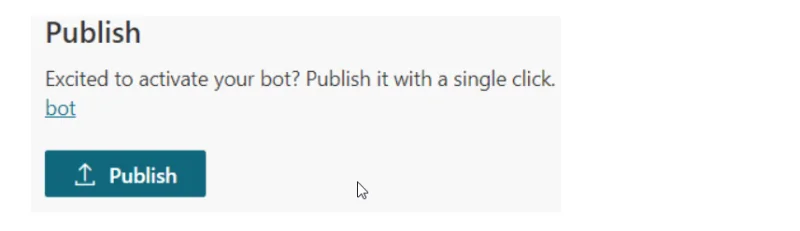
Moći ćete stvoriti svog chatbota na portalu Power Virtual Agents, a nakon toga ćete ga moći integrirati s Microsoft Teams samo pritiskom na jedan gumb.
![Microsoft pojednostavljuje Teams Chatbotove s Power Virtual Agentima]()
![Microsoft pojednostavljuje Teams Chatbotove s Power Virtual Agentima]()
Ako ste programer, Microsoft je također objavio dokumentaciju o tome kako točno izraditi chatbot.
Kako radi Microsoft Teams Chatbot?
Michael Chow, viši voditelj programa za Microsoft, opisuje stvarni primjer upotrebe u postu na blogu :
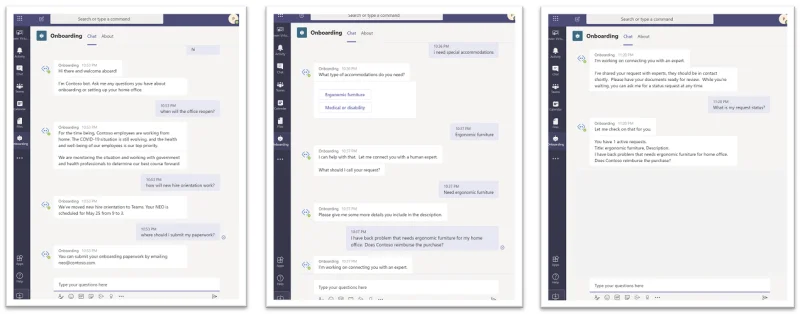
An employee who has just joined Contoso asks a few questions related to office reopening, new employee orientation, and uploading documentation.
Then, he moves on to ask for support with special accommodations, specifically ergonomic furniture. The bot needs to connect him with an HR expert to understand the situation better.
The bot gathers some information to create a request ticket and submits it to the Onboarding channel in Teams where HR experts can see the request and handle it.
Since there is a longer than normal wait time today, the employee checks his request status with the bot to make sure it is still active.
![Microsoft pojednostavljuje Teams Chatbotove s Power Virtual Agentima]()
![Microsoft pojednostavljuje Teams Chatbotove s Power Virtual Agentima]()
An onboarding expert sees the notification in the Expert assistance channel in Teams and reaches out to the employee. After helping the employee out, he returns to the Expert channel and closes the ticket.
The employee can also check the status of his requests again and confirm that it has been closed.